The hardware · optional add-on · The Access line · ships Summer 2026

The witness that never goes dark.

When the OS is dead, software can't save it. The Access line watches the video signal and presses the buttons — so a crashed, frozen, or unbootable machine is still on your graph.

Out of band. Zero apps installed on the PC. Alive on standby power, reachable over your mesh like any other device you own.

Pre-order at criticalerrorcomputing.com Watch it save a machine
0 apps
Installed on the PC
4K@45
Capture · 20–30 ms
$149.99+
Once · no subscription
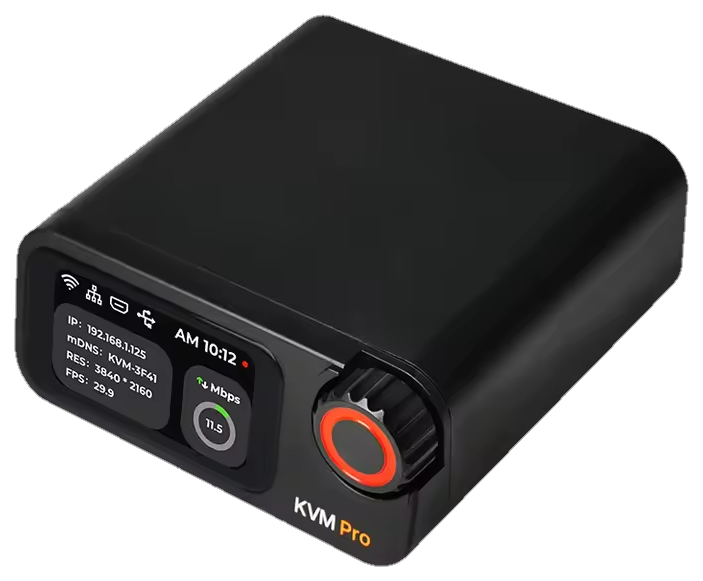
CEC Access Pro — desk unit with onboard screen
The demo · simulated, but this is the real sequence

2 a.m. Blue screen. Nobody drives anywhere.

The machine's own OS agent goes silent, the witness takes over on standby power, and a Concierge session — that you approve — reads the screen, cycles the power, and watches it come back. Press play.

concierge://session · OS-down recovery
witness AX-3F4L
Witness feed● alive
● DESKTOP · LIVE
host statealive
linkhost USB path
screen-statenormal
session actionidle
The witness streams to your devices over the mesh, end-to-end encrypted. A Concierge only ever joins with your approval — logged, watchable, revocable.
How it wires

Eyes on the video. Fingers on the buttons.

Four connections, all of them dumb on purpose. The PC can't tell the witness from a monitor and a keyboard — which is exactly why it works when nothing else does.

The patient ANY PC · ANY OS · NO APPS HDMI out · USB port front-panel header EVEN WHEN IT'S DEAD The witness ACCESS CUBE / INTERNAL / PRO sees · 4K capture types · emulated USB presses · ATX power ALIVE ON STANDBY POWER your mesh HDMI → ← USB HID ← ATX PWR/RST ETH / WI-FI E2E ENCRYPTED
Feel it · live in your browser

Latency is the difference between watching and driving.

Move your cursor across the panels. The hollow ring is your hand; the glowing dot is what the remote screen would show. Standard capture answers a beat behind — Pro stays glued to you.

your cursor what the remote screen shows move your cursor across the panels →
Standard90–230 ms
Pro20–30 ms

standard capture · access cube & internal — pro capture · internal pro & access pro

The line · three ways in

Pick your witness.

Same job at every price: keep the machine on your graph when its OS can't help. They differ in how sharp they see and where they live.

CEC Access Cube — palm-sized box with its own Ethernet
[ AX-01 / entry ]

Access Cube

$149.99 · once

A palm-sized cube with its own network cable. Enough to remote in, see the screen, type, and power-cycle the machine. The budget way in — and it still does the whole job.

1080p @ 60 captureOwn EthernetATX power board includedFanless
Full technical specification · Access Cube
Computing unit
LicheeRV Nano · SG2002 · RISC-V
Resolution
1080p @ 60fps
Video encoding
MJPEG · H.264 (in development)
Video latency
90–230 ms
UEFI / BIOS access
Emulated USB keyboard & mouse
Emulated USB storage
IPMI
Wake-on-LAN
WebSSH
Custom scripts
Ethernet
10/100M
ATX power control
USB-interface IO control board (included)
OLED display
0.96″ 128×64 · white
Serial terminal
2 channels
microSD card
Included · ready to use
Expansion
PoE
Power
0.2A @ 5V · PC USB or auxiliary
Cooling
Silent · fanless
Dimensions
40 × 36 × 36 mm
[ AX-02 / builder ]

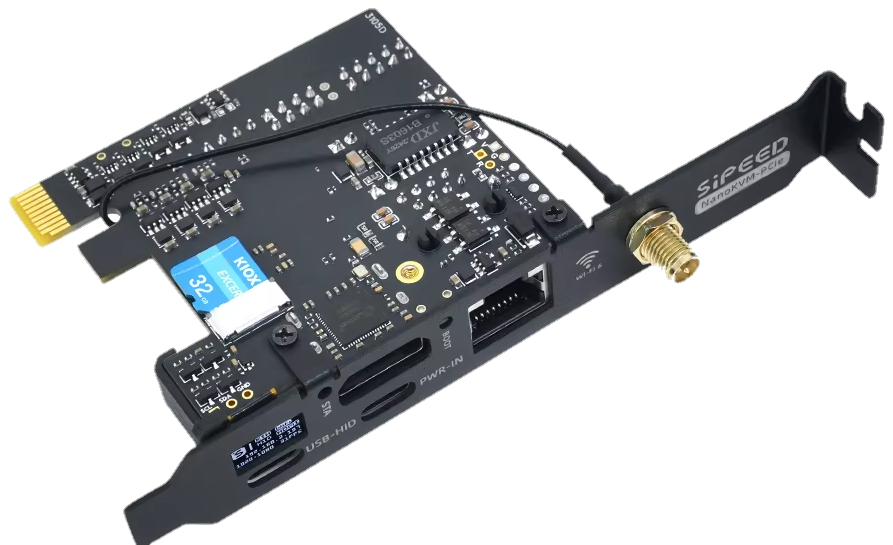
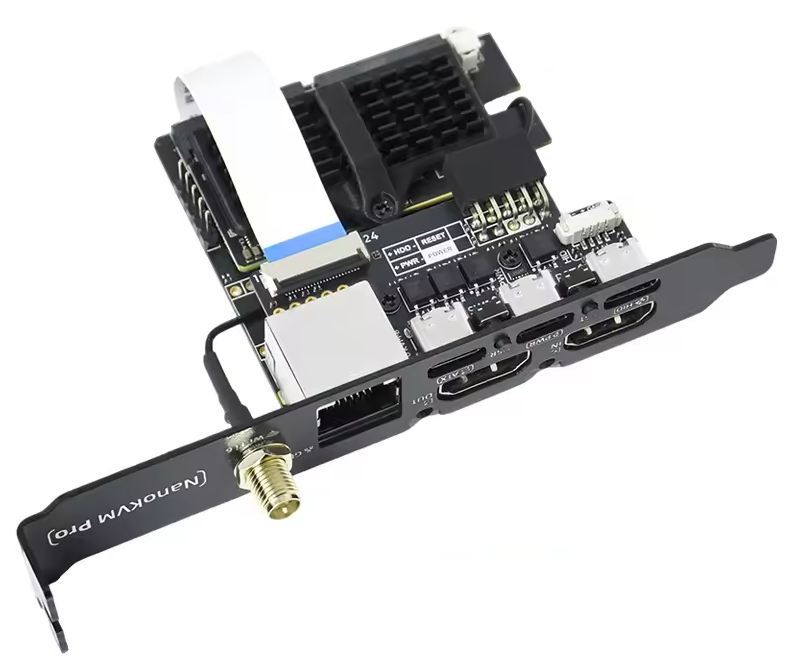
Access Internal

$199.99 standard · $279.99 pro

The same platform on a card that lives inside the case — no desk clutter, powered by the PSU's standby rail, wired straight to the front-panel header. Ships standard in every CEC build. The Pro card steps up to 4K capture, gigabit, and Wi-Fi 6.

Low-profile cardUp to 4K@45 (Pro)Wi-Fi 6 + GbE (Pro)Internal headers
Full technical specification · Internal Std / Pro
Standard
Pro
Computing unit
SG2002 · RISC-V
AX630C · 2× A53 @ 1.2GHz
Memory
256MB DDR3
1GB LPDDR4X
Storage
32GB microSD (included)
32GB eMMC · 300MB/s
Resolution
1080p @ 60fps
4K @ 45fps · 2K @ 95fps
HDMI loop-out
4K loop-out
Video encoding
MJPEG · H.264
MJPG · H.264 · H.265
Video latency
90–230 ms
20–30 ms
Audio transmission
UEFI / BIOS · USB HID · ISO
IPMI · Wake-on-LAN
WebSSH · custom scripts
Ethernet
10/100M
1000M
Wi-Fi
Included
Wi-Fi 6 · included
PoE
Included
Included
ATX power control
Direct to 9-pin front-panel header
Internal ATX + front-panel headers
Display
0.49″ 64×32 white OLED
0.96″ 128×64 OLED
Serial terminal
2 channels
2 channels
Form factor
Low-profile internal card
ATX internal card
Power
0.2A @ 5V · multiple modes
0.6A @ 5V · internal USB + headers
Cooling
Silent · fanless
Silent · fanless
Dimensions
66 × 57 × 18 mm (no panel)
ATX form (draft)
Pro dimensions and ATX variant are pre-production — final numbers at ship.
CEC Access Internal — low-profile card CEC Access Internal Pro — ATX internal card
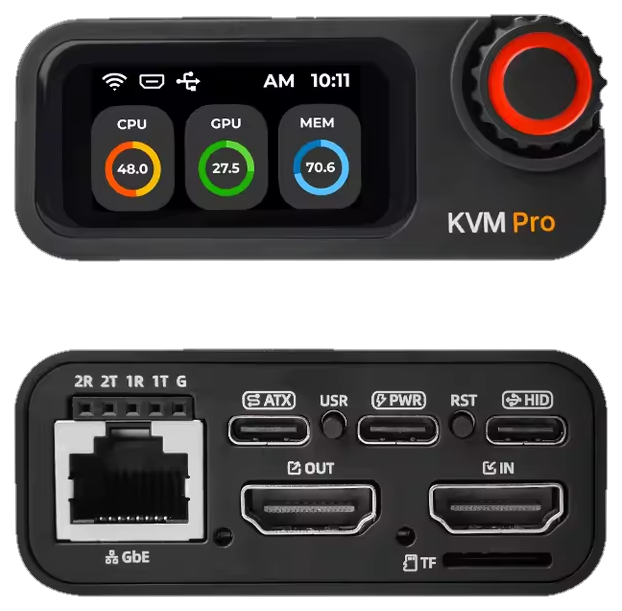
CEC Access Pro — front and back
[ AX-03 / flagship · most popular ]

Access Pro

$299.99 · once

The desk unit. 4K capture at 20–30 ms — sharp enough to game on remotely — with its own screen telling you what it sees, gigabit plus Wi-Fi 6, and a 4K loop-out so your real monitor stays plugged in. Alive even when the PC isn't.

4K@45 · 2K@9520–30 msOnboard 1.47″ LCD4K loop-outUSB-C / PoE
Full technical specification · Access Pro
Main control
AX630C · 2× A53 @ 1.2GHz
Memory · storage
1GB LPDDR4X · 32GB eMMC @ 300MB/s
System
AllMyKVM — CEC's open firmware fork
Resolution
4K @ 45fps · 2K @ 95fps
HDMI loop-out
4K loop-out
Video encoding
MJPG · H.264 · H.265
Audio transmission
UEFI / BIOS access
Emulated USB keyboard & mouse · ISO
IPMI · Wake-on-LAN
WebSSH · custom scripts
Serial terminal
2 channels
Ethernet
1000M
Wi-Fi
Wi-Fi 6 (optional)
microSD expansion
ATX power control
Display
1.47″ 320×172 LCD · 0.96″ 128×64 OLED
Power
0.6A @ 5V · USB-C / PoE
Dimensions
65 × 65 × 28 mm
With the app

It's just another node on your graph.

No second app, no vendor portal. A witness claims into your fleet like any laptop — its console opens in the same tab, its power button is a button in the drawer, and sharing it follows the same grants as everything else.

  • Claim it with the same one-tap adoption as any device
  • Streams ride your mesh, end-to-end encrypted — relay only when needed
  • No second login — approved mesh peers open its console directly, no port forwarding, no exposed web page
  • Works without us: AllMyKVM, CEC's open firmware fork — no account, no subscription
Get the app — it's free
node — access-pro standby · listening
access-pro hardware
watching: den-tower · HDMI + HID + ATX
host screenlive · 4K@45
host poweron · 41 days
actionsopen kvm · power · reset · attach
New · plug & claim · mdns on your lan

Out of the box, it's already calling you.

A fresh witness announces itself on your LAN — before it knows the time, before it's touched the internet. Your app hears it, you tap Claim, and it's wearing your name.

01 · on power

It calls out over mDNS on a claim channel that never leaves your network. Clock-free — it works before NTP.

claim a device
AllMyKVM · kvm-3f41
found on your LAN · just now
Claim
02 · in the app

Every device of yours on that LAN shows the newcomer instantly. No IPs typed, no cloud round-trip.

KVM-den
yours kvm 🔗 fleet
03 · claimed

It appears in your claim sheet — tap Claim, done. Attach it to a machine and it renames itself to match.

allmystuff-local-claim-v1 · clock-free · public claims off by default · mesh transport by MyOwnMesh

The fine print, in large print

A box that can press your power button should answer hard questions.

keys

Connection keys are made and stored on the device, never on a CEC server. Nobody at CEC can connect on their own.

streams

Video travels directly between your devices, end-to-end encrypted. A relay, when needed, only passes data it can't decrypt.

sessions

Repair sessions start with your approval, every action is logged, and you can watch live or revoke at any moment.

ownership

Firmware and software are open source and self-hostable. No subscription is ever required to use your hardware.

Pre-order · ships Summer 2026

Put a witness on the machine that scares you most.

Cube for the NAS in the closet, Internal for the rig you're building, Pro for the desk. Pre-orders ship through Critical Error Computing.

Out-of-band · works with the OS dead · no apps installed on the PC